Engineering Courses Dashboard
Any Idea Can Be Prepared
- Web Templates.
- Scalable Applications.
- Customizable Solutions.
- Landing Pages.
- Portfolio Websites.
Description
A bilingual (Arabic-first RTL, English LTR) admin dashboard for an in-person engineering course business. The owner and an operator publish courses and sessions, see who has registered and paid, handle refunds, moves and cancellations, take attendance, manage assistants, answer website messages and edit the instructor profile shown on the public site. Built with React 19 and React Router 8 as a single-page app, with a typed RTK Query layer, accessibility scans and security headers. The public demo runs on an in-browser mock API with sample data, ready to switch to the real backend.
Project Gallery
Demo Credentials
This build runs on mock data with no real backend — feel free to log in and click around freely.
Password: dashboard-demo
| Role | |
|---|---|
| Owner (the engineer) | owner@example.com |
| Admin (operator) | admin@example.com |
Business Need
- An instructor who runs courses in cohorts needs to open a new one without waiting for a developer. Guided course creation with a publishing checklist makes a cohort bookable the same day, and blocks publishing until the bilingual essentials are filled in.
- Counting seats and payments by hand leads to unpaid or overbooked sessions. Seat bars, payment totals for any filter and a rule that capacity cannot drop below the seats already sold keep the numbers trustworthy.
- Late payments, refunds and moves between sessions are decisions nobody is alerted to on a spreadsheet. A Needs action list on the home page and strict, idempotent refund, move and cancel flows with a full history put those decisions in front of the owner.
- Door-day chaos costs time and trust. Session rosters, a printable attendance sheet and per-meeting manual check-in give a reliable record of who paid and who came.
- A website goes stale when updating it needs a developer. Editing the public profile, certifications and career journey from the dashboard keeps what students see accurate.
Item Tags
React 19React Router 8TypeScriptRedux ToolkitRTK QueryTailwind CSS v4Radix UIMSWVitestPlaywright
Project Overview
- The dashboard is the private control room behind an in-person engineering course business. Where the public website sells and books, this app lets the owner and an operator publish, check and fix everything behind the scenes.
- Each area answers one question: Home (how is the business doing), Students (who is registered), Payments (do the numbers reconcile), Courses and Sessions (what is being sold and who is coming), Assistants, Messages and Profile.
- Money actions are guarded. Refunds, moves and cancellations follow shared rules in pure domain code, send an idempotency key so retries are safe, and keep a history. The dashboard records refunds made in the payment gateway and never moves money itself.
- Arabic and right-to-left are the default, with English one tap away and remembered per account. The layout is phone-first, with tables that turn into readable rows and numbers and mixed Arabic and English text rendering correctly.
- The app runs against a typed API contract. The public demo answers every request from an in-browser mock API (MSW) with sample data, and the real backend is the next step. It is one of three connected apps with the booking website and a planned door-scanning app.
Project Pages
- Sign In: Email and password sign-in with generic failure messages, lockout after repeated failures, and notices for expired sessions and sign-out.
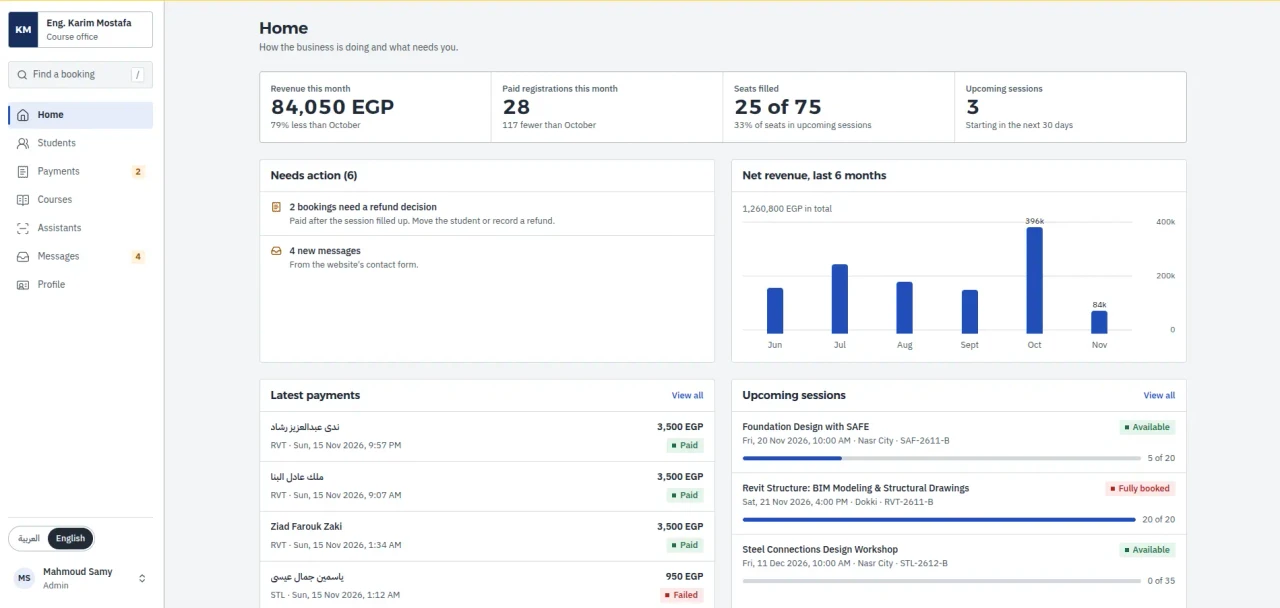
- Home: Revenue, paid registrations and seats filled, a six-month revenue chart, upcoming sessions, latest lists and a Needs action list.
- Students: Search and filter registrations by name, phone, email or booking reference, with paging, one-tap WhatsApp and CSV export.
- Student: One student's booking, payment, ticket and attendance history.
- Payments: Totals for any filter, a full payment history and a details sheet with refund, move and cancel actions, plus CSV export.
- Courses: Course cards and a guided Add course dialog.
- Course: Six tabs for overview, content, curriculum, FAQ, sessions and publishing, with a readiness checklist before a course can go live.
- Session: The session roster, a printable attendance sheet and per-meeting attendance with manual check-in.
- Assistants: Staff profiles with photos, with activation and deactivation that keeps their history.
- Messages: An inbox for the website's contact form, with read, new and archive states and one-tap replies by email or WhatsApp in the sender's language.
- Profile: Seven tabs for personal details, contact, bio, key numbers, certifications, career journey and account settings, live on the public website.
- Quick Search and 404: A keyboard-triggered search for any booking by reference, phone or email, and a localized not-found page.
Key Features
- Dashboard home with revenue, paid registrations, seats filled, a six-month revenue chart, upcoming sessions and a Needs action list.
- Students and payments tables with URL-driven filters, paging, per-filter totals and CSV export.
- Refund, move and cancel flows with shared money rules, idempotency keys, double-click protection and a complete history.
- Course management in six tabs, bilingual content and curriculum, sessions with meetings in Cairo time, and a publishing checklist that blocks going live until the essentials exist.
- Capacity protection: seats can never drop below the number already sold.
- Session rosters, a printable attendance sheet and manual per-meeting check-in.
- Message inbox with optimistic read, new and archive states and reply links that match the sender's language.
- Instructor profile editor with image upload rules, certifications and a career journey that feed the public website.
- Global quick search opened with the slash key, plus an unsaved-changes guard on tabs and forms.
- Arabic-first RTL with English one tap away, saved per account, and bidirectional text handling for names, phone numbers and references.
- Accessibility scans against WCAG 2.2 AA in both languages, with end-to-end tests of the main flows in Arabic and English.
- Performance and security: a tracked sign-in bundle budget, generated security headers and a content security policy, and an auth guard that tells an outage apart from a sign-out.